• Welcome to For E Bodies Only !

    We are a community of Plymouth Cuda and Dodge Challenger owners. Join now! Its Free!

How do I get rid of this pop up ?

DrEamer

Well-Known Member
Joined
Nov 3, 2017
Messages
502
Reaction score
296
Location
Oregon
I'm not sure what I did, but whenever I log in, or change a to a different page, this pops up. I can click it to make it go away, but it comes back. Also, if I try to do a search, the name auto fills for the member Sublime one. It just started yesterday.
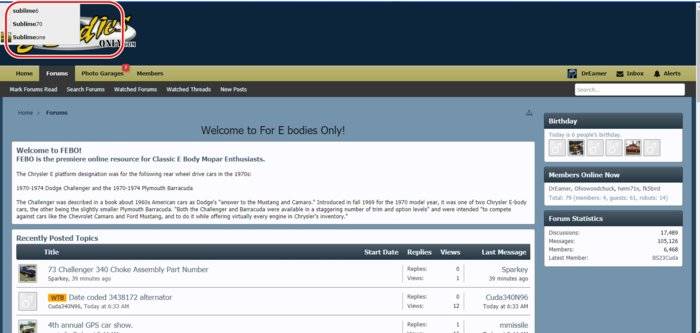

Forum.jpg
 
Joey. I think he is getting a members list drop down menu. I got it before but don't remember how. DrEamer clear your devices Cache and it may go away.
 
I tried turning off the add blocker, emptied the Cache, the only thing that made it go away was turning off JavaScript, but then I lost some of the other functions if I wanted to do a search. The only way to make it go away is to switch browsers. I am having the problem in Chrome, but FireFox seems fine so far.
 
Do you have any extensions / plugins installed? If you click the Search textbox, what appears?
 
No real plug ins that I can remember or find. This is what I get if I use the search function after hitting the more option. It always auto fills with Sublime.

Forum Search.jpg
 
Back
Top